


S-PLAY PLAYER ENTTEC
 In Stock
in stock

Specification
-
VAT:23,00%
-
Weight:1,06kg
-
UPC Code:9351074003512
-
Manufacturer Code:70092
-
CN Code:84714900
-
Symbol:70092
Product Description
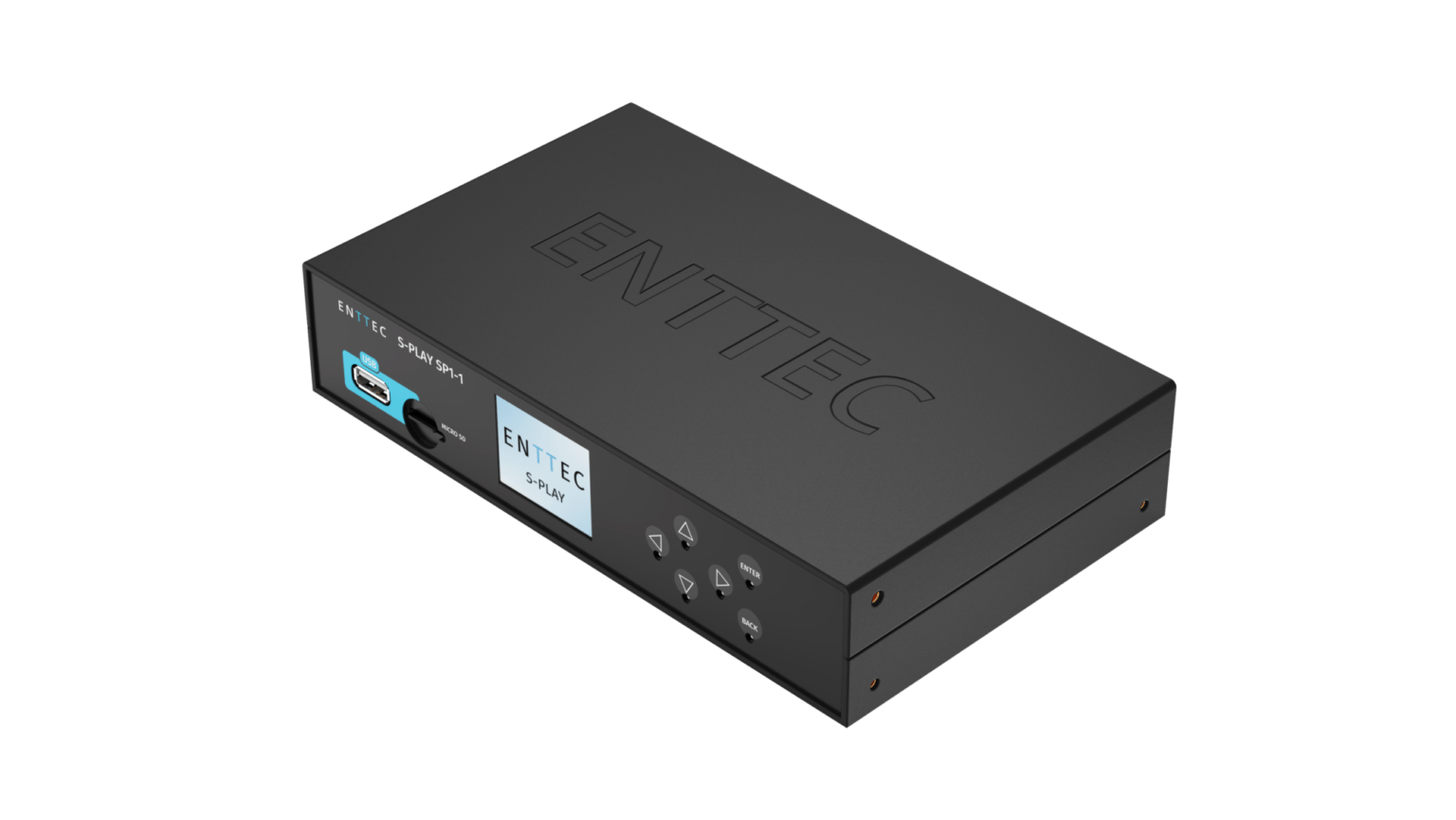
Engineered for projects that require precise automation, the S-PLAY is your all-in-one solution for the recording, triggering, and activation of not only light shows but video, non-lighting events, and much more.
The revolutionary smart show controller for hassle-free, professional light shows and automated projects.
Play back multiple shows simultaneously and install it virtually anywhere with flexible mounting options.
Say hello to S-PLAY:
The smart player for light shows.
With a built-in effects generator and intuitive, onboard controls to record, edit, schedule and play cues, you don’t have to be an experienced lighting designer or systems integrator to conjure up amazing performances using the S-PLAY, but your audience will think you are. Plug and play show technology has never before looked so good, or been this easy to master.
With countless applications from theatrical or entertainment events to architectural design and smart home integrations, S-PLAY is the dream companion for any automation project. You can even remotely access your S-Play from anywhere in the world via the internet or a 4G router!

Use the web interface to manually create static scenes, RGB(W). Create Effects & Gradients. Alternatively, you can record up to 32 eDMX universes through either sACN, Art-Net, or two physical universes using the S-PLAY’s rear DMX ports.

Using the intuitive timeline editor, multiple recordings and scenes can be stitched together while adding triggers and events to allow the S-PLAY to integrate into the heart of any control system.

Play back multiple shows simultaneously from the internal scheduler, or when triggered in real time by building automation software (e.g. Control4), iPad Apps, pressure pads, motion detectors, push buttons and much more!
Why S-PLAY? Let’s take a closer look.
Do you need to run a light show featuring DMX or LED pixel control without leaving a laptop or computer on site?
With a huge 32U of playback, plus the complete flexibility that the S-Play triggers, events, and onboard effects provide, our S-Play show controller will take your installs to a level you never knew possible. To discover how, we’ll walk you through some of S-PLAY’s key features and processes.
Let’s begin with some simple terminology that we use for ease of operation when describing the main functions:
CUE: The basic building block of your show – can be a static scene, an effect/ generated generated by the S-Play, or a dynamic recording.
TRIGGER: Control information transmitted into the S-Play, allowing for the activation of a cue/playlist.
EVENT: Control information transmitted out of the S-Play, allowing for the activation of an external device.
PLAYLIST: A sequence of cues, triggers, and events stored as a group on a dynamic timeline.
INTERFACE: A user-definable set of buttons and sliders to control a playlist. This presents end users of the installation with a scalable web page that displays only the playlist controls they need and adapts to their screen size.
SCHEDULE: An action that can either play, pause or stop a playlist based on a fixed time, moon cycle or inline with sunrise and sunset.
Basic Setup
The Interface
While S-PLAY’s handy onboard LCD menu is perfect for accessing key functions, especially while your show is underway, it’s the dedicated browser interface where you’ll get to experience the full power and versatility of S-PLAY at your fingertips.

Create static or dynamic cues
Static scenes: Individually add or bulk assign DMX values to channels, or simply record them from a DMX source.
Effects: Creation of basic pixel effects allowing for BPM, colour and speed to be set for a range of pixel types for a user-defined time period.
Dynamic recordings: Record a DMX source using the five-pin XLR ports, or Art-Net or sACN data via the network port.
Start and stop recording manually (perfect for simple, non-looping sequences), or configure precisely using remote triggers via the S-PLAY’s web browser home page (for more complex or seamlessly-looping shows).
The SPLAY’s internal and removable storage options allow for complete flexibility to accommodate incredibly complex shows. Save your recordings using the S-PLAY’s impressive 8GB internal memory, or expand your storage capacity with a micro SD card via the handy slot on the front of the unit.
ENTTEC recommends Class 10 (minimum write speed of 10MB/s or higher) for best performance and have successfully tested cards of up to 64GB capacity.


Playlists
With easy access to your entire cue library within the web browser, simply drop your dynamic recordings, static scenes, effects & gradients onto the timeline to create a playlist, then drag each cue around to set start and end times or transitions such as fading in or out.
Group multiple cues together in a sequence to be stored and played back at will. The S-PLAY’s engine also allows for multiple playlists to be triggered at the same time with varying priority levels or to allow only one playlist to be active per group.
Triggers
With support for OSC, RS232, UDP, DMX, Art-Net, sACN protocols and digital contact closure inputs, you can trigger the S-Play with a number of external devices.
Use the four dry contact inputs (GPIO) with sources as varied as a switch on the wall, a BMS dry contact relay (e.g. to allow DALI systems to control DMX playback) or even a PIR motion sensor. Save and name your trigger, then simply drag it onto the playlist timeline sequence to create new possibilities for users to interact with your lighting.

LED pixels
First and foremost, the S-PLAY was designed to be your go-to unit for control of LED pixel shows, which is why – in addition to the two DMX ports that can be assigned as outputs for your more traditional DMX fixtures – the S-PLAY also features the ability to playback sequences via sACN or Art-Net up to 32 universes!
By using a combination of ENTTEC’s pixel control products, you can easily expand your options to get up to 32U of pixel control. Alternatively, connect our eDMX Gateways for more DMX outputs. Still need more universes? Just add more S-PLAYs using the multiunit sync function!
The S-PLAY is far more versatile than you might imagine. With its ability to coordinate and control many different components of an entire performance, S-PLAY allows you to integrate so much more than just lighting into your project.
Events
With the ability to create and name Events, you can use relays, UDP, RS232 or OSC to activate equipment as part of a live show or sequence, such as curtains or hydraulic effects that need to operate at a precisely-calculated moment.
What’s more, Events can be used to generate short bursts of Art-Net, DMX, or sACN data to control fog machines or fans as well as lights with a higher priority than all active playlists.
An Event in one playlist can even be used to activate a Trigger in the same or another S-PLAY unit! The only true limit to the variety of external factors you can control using S-PLAY is your imagination.
Failsafe
In the event that an external 3rd party device fails (preventing the triggering of an event within the S-PLAY), you can override and advance your playlist manually by simply pressing ‘play’ on either the intuitive LCD or custom web interface … and your show will continue as if nothing had gone wrong!
Interfaces
Users can easily control the S-PLAY’s shows from a remote device such as a laptop or smart phone.
Provide as much or as little control over the system as your client needs by creating custom web interfaces with buttons and sliders to allow end users to control your playlists.
Set an interface to be the S-Play’s default landing page.
Scalable, responsive design that fits various display sizes.
Playback controls for all playlists (play/pause/stop).
Playback control for a specific or all playlists
Custom colour selection.
This is an effective way for users with little technical experience to interact with the S-Play without the risk that they may accidentally change playlist settings or break anything!
Hardware.
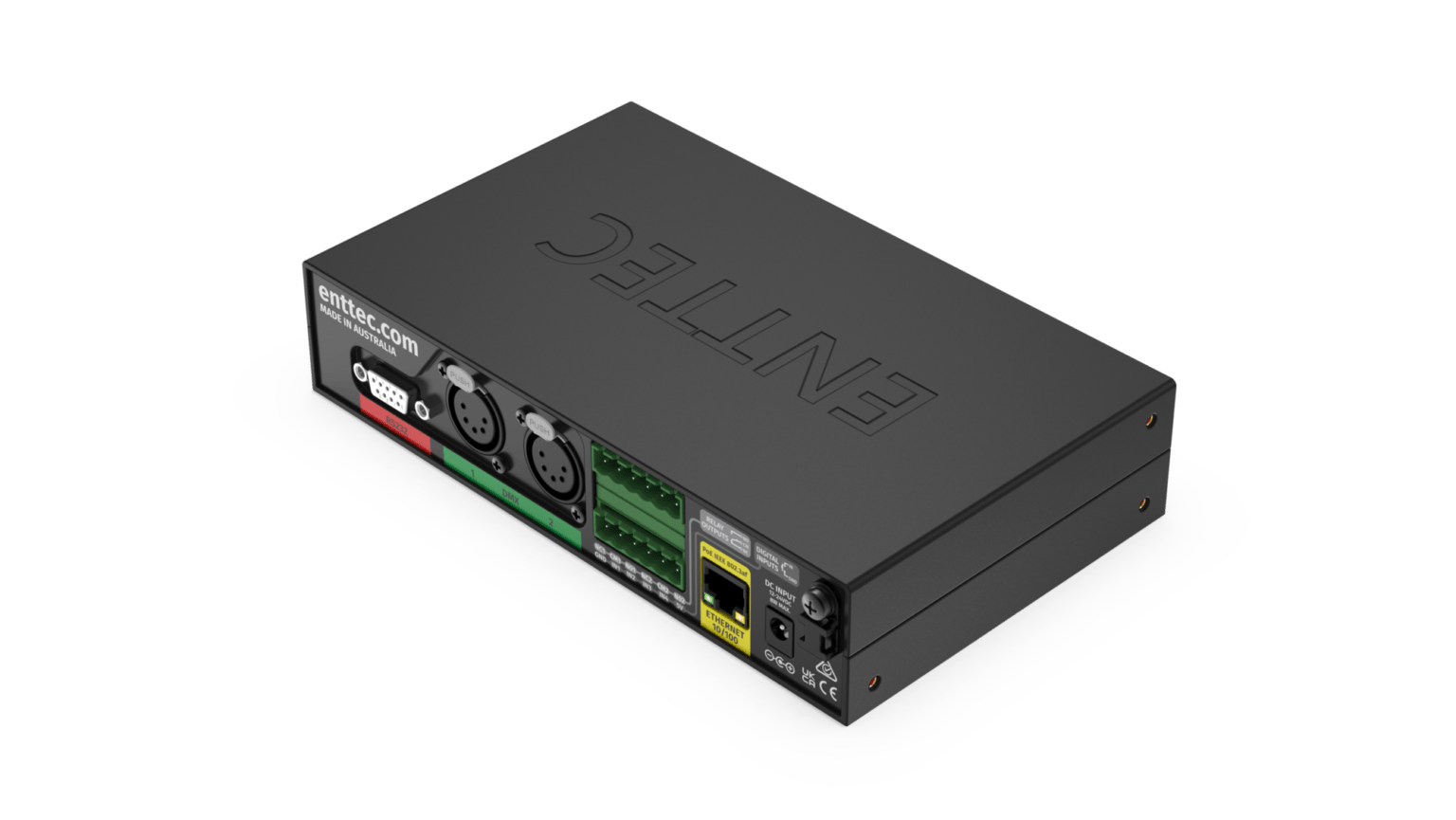
Reliant on ENTTEC’s EN-Case design, the S-PLAY’s hardware makes it simple to install in a range of scenarios straight out of the box without the need to purchase extra accessories.
Integrated LCD menu

Modify network settings, check playback status, update firmware or create backups by inserting a USB thumb drive and selecting the relevant options without needing to access the web interface.
The small details matter

If you opt to use the DC power supply provided with the S-Play instead of PoE we’ve got you covered with an integrated cable retention mount to stop any accidental unplugging.
Integrate
Unlock a world of potential by integrating the S-Play into your existing automation setup for access for up to 32 universes of lighting control and triggering. Just some of the automation systems you can integrate the S-Play and protocols they use can be found below:
- Home Automation
- Building Automation Management
- Conference Rooms
- Façade Lighting
- Art Installations
- Hotel Lighting
- System Control
- Hospitality Lighting
- Architainment Lighting
The core of your installation.
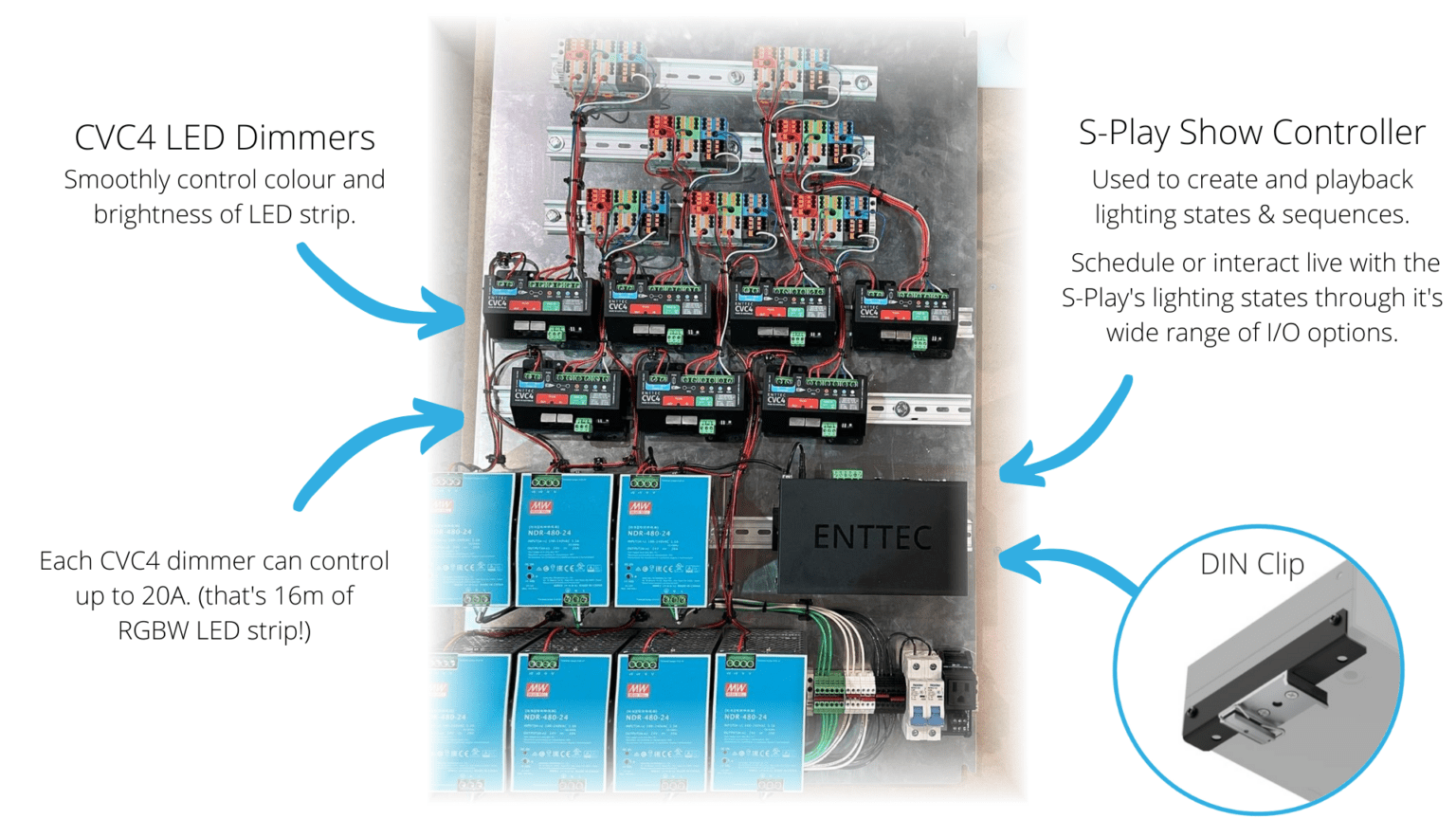
It’s not only the S-Play’s software that makes integration a breeze. It’s flexible hardware and I/O options mean connection to other devices on any surface is simple. By pairing it with other ENTTEC products you can create powerful infrastructure and control systems easily. Take this system for controlling large quantities of LED strip put together by New Aspect Design to dim multiple LED zones from triggers or to a schedule.
Features
- Reliable, compact solid state design: the perfect tool for installations.
- In-built controls to create, record and play cues.
- Web based scene, gradient generator and FX engine allowing full show creation to be carried out on the S-play itself.
- Internal memory (8GB) supporting over 10 hours of 32 universe recording at 44FPS (plug in an external Micro SD card to increase this recording size up to 64GB).
- Up to 32 Universes of Art-Net and sACN recording & playback.
- Monitor DMX values when recording cues.
- Variable Art-Net/sACN refresh rate (60FPS max.).
- Four digital inputs to trigger device from external sources.
- Two-Universe physical DMX input or output.
- Two relay outputs to control external devices.
- Create playlists from dynamic, static and internal effect cues.
- Send options: RS232, UDP, OSC, Art-Net, sACN, DMX & Digital Inputs.
- Remote trigger options: RS232, UDP, OSC, Art-Net, sACN, DMX & Digital Inputs.
- Create custom web interfaces.
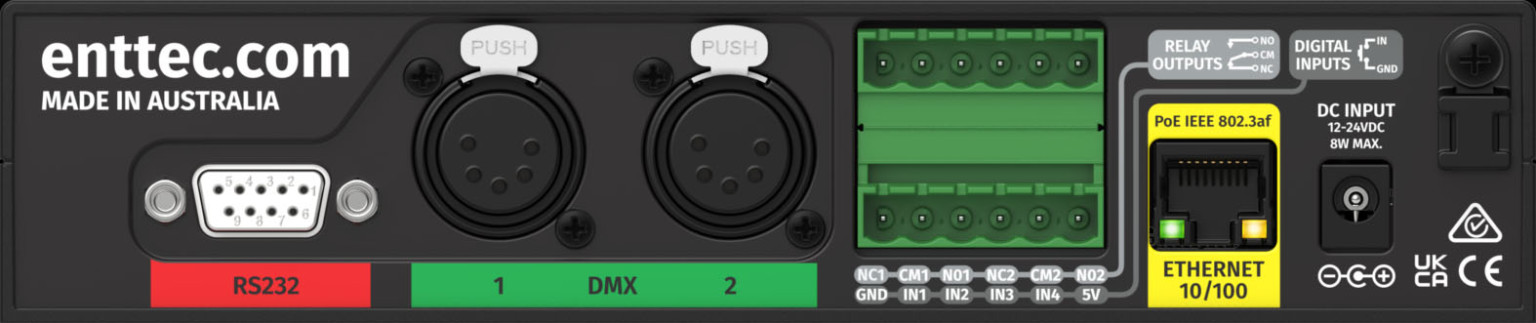
The rear of the unit is packed with useful I/O making the S-PLAY ready for virtually any project:
Inputs/Outputs
- 10/100 network port with Power over Ethernet (If you are not using PoE, the S-PLAY supports a direct 12-24vDC power input through a DC jack).
- 2 x bi-directional 5-pin XLR DMX Ports for recording or playing back shows.
- Bi-directional serial port to send or receive RS232 commands.
- 4 x Digital contact closure inputs for detecting switching.
- 2 x change over relays for controlling analog or switchable hardware
Specification:
- Input Voltage: 12 V DC to 24 V DC
- PoE: IEEE 802.3af
- Max. Power Draw: 8W
- Unvierses of Input Protocol:
- 2 USITT DMX512-A
- 32 ArtNet/sACN Universes
- DMX Refresh Rate (FPS):
- Art-Net & sACN: 1 to 60
- USITT DMX512-A: 1 to 44
- Internal Storage Capacity: 8GB or higher
- Output Protocol: DMX512/Art-Net/sACN
- Connectors:
- 1X DC Jack (Power)
- 2X Female XLR5 (DMX512)
- 1X RJ45 (Ethernet)
- 1X Male DB9 (RS232)
- 1X USB Type-A (Host)
- 4X Dry Inputs
- 2X Relay Outputs (max 50vDC / 60W)
- 1X Micro SD
- IP Rating: IP 20
- Operating Temperature: 0⁰ to 50⁰ C
- Relative Humidity: 0 – 95% (Non-Condensing)
- Cooling Method: Convection
- Shipped Weight: 1.2 Kg
- Packaging Dimensions: 310 X 260 X 75mm
To Download
- ENT70092_S-PLAY_Datasheet _ENG.pdf (380 KB)
- ENT70092_S-PLAY_OSC_api_spec_ENG.pdf (981 KB)
- ENT70092_S-PLAY_Remote_Access_Guide_ENG.pdf (2234 KB)
- ENT70092_S-PLAY_Specification_ENG.pdf (248 KB)
- ENT70092_S-PLAY_TouchOSC_Guide_ENG.pdf (1028 KB)
- ENT70092_S-PLAY_User_Facing_CAD_ENG.pdf (487 KB)
- ENT70092_S-PLAY_User_Manual_ENG.pdf (4034 KB)